Search

Håvard Siegel Haukeberg

Paste life: Ctrl+C -> Ctrl+V

Manage Windows RT with Windows Intune

This was even easier.

Once you have enabled Windows Intune for Mobile Device Management its easy.

Step 1:

Connect your Windows RT Device to Windows Intune by clicking Start -> Type Company Apps -> Click Settings – > Enter your User Name and Password

Step 2:

Download the Company Portal App from Market Place. Once installed, start it and click “Enroll this device”


To distribute apps you need a sideloading key.

See this blog for sideloading

http://richfrombechtle.wordpress.com/2012/10/23/windows-8-enterprise-sideloading-keys/

And/or this technet article for reference
http://technet.microsoft.com/en-us/library/hh852635.aspx


Manage Mobile Devices with Windows Intune

Its really easy.

Full guide can be found here:

http://technet.microsoft.com/en-us/library/jj733640.aspx

Step 1:

Navigate to Administration and click Mobile Device Management

Step 2:

On the far right side, click “Set Mobile Device Management Authority

Done!

Now you may start to add Windows Phone 8, Windows RT, iOS and Exchange Units.

Surface commercial order, regardless of units

surface commercial order

This correction appeared!
You may now order any quatity of Surface units as a commercial order!

SharePoint 2013 Quote in Office 365

Feature

Office 365 Enterprise plans (including E1 – E4, A2-A4, G1-G4, and SharePoint Online Plan 1 and Plan 2)

Storage base per tenant

10 gigabytes (GB) base customer storage.

Storage per user (contributes to total storage base of tenant)

500 megabytes (MB) per subscribed user.

Storage base per tenant

10 GB + 500 MB per subscribed user + additional storage purchased. . For the maximum number of users (500,000), the base storage allocation is 25 Terabytes (10 GB + 500 MB * 500,000 users), and you can purchase more storage.

Site collection quota limit

Up to 100 GB per site collection.

Site collections (#) per tenant

3000 site collections (other than Sky Drive Pro personal sites).

SkyDrive Pro storage allocation

7 GB (as soon as provisioned). This amount is counted separately, and does not add to or subtract from a tenant’s overall storage pool.

Public Website storage limit

5 GB

File upload limit

250 MB per file.

Maximum number of users per tenant

1 – 500,000

 Note    If you have more than 500,000 users, please contact the Microsoft represenative to discuss detailed requirements.

Microsoft Surface Commercial Order


Purchase Process

  1. For customers who are ready to place orders for Surface products and accessories, there are two options below. We are currently working on scalable distribution solutions and will keep you updated via our website.
    Purchase direct from Microsoft using the online form at www.surface.com/commercialorder.
    Customers who do not have a volume license agreement may experience longer processing times due to credit term management and processes.  Order processing times vary by region and order volume and typically range between 3 and 10 days.
  2. Purchase from authorized resellers (at retail).  Any customer may choose to purchase through one of the authorized Surface retailers in their market. Payment terms, the ability to accept purchase orders, financing, and the availability of the extended commercial warranty vary by retailer. 

Wirelessly transfer screen to TV or Projector (WiDi)

What you need :
1. A laptop/slate/tablet/pad with Intel 3rd generation core (e.g. Core I3/I5/I7)
2. WiDi compatible TV or Projector
3. Install Widget on you laptop/slate/tablet/pad and you are ready to go.

The technology that enable you to transfer screen content to a TV or projector has been around for 6-7 years now, BUT it has been hard to use.

DLNA and AirPlay is probably the easiest to use technologies which people are familiar with.
However, there is a third option called WiDi. This technology allows the e.g. Teacher to walk around in a classroom while showing the content of his/her screen on a remote screen.

Apple delivers this via AppleTV for Mac
Intel delivers this via WiDi for PC

7 things you should know about wireless projection

Intel Wireless Display works on 3rd generation Interl Core Processor.
it runs on Windows 7 and Windows 8


If you have these two in order, go here to install the Drivers* on your laptop:
Intel WiDi Drivers

*Most likely you only need the WiDi Gadget (Step 4)

If you cannot find a suitable projector, what about a 60″ plasma display?
LG 60″ plasma display with WiDi

</Håvard>

A New Office!

New Office (Office365)

Office is now a service. This is the biggest change in Office since it was created. Office is now delivered as a service, hence there will not be any more versions related to years.

Its made for touch and connectivity to the web, always preferring to save online in Skydrive or SharePoint.

Some stuff thats new:

Multiple inputs: New Office works great on pen, touch and mouse. Office fungerer utmerket på alle dine enheter.

Cloud storage:  Office will launch when you browse to the online storage which contain your files. E.g. Skydrive. You can also share them from there

PC/Mac: New Office you can use on both PC’s and Mac with the same features.


office-2013-logo
Office 365 Home Premium

  • 1- Year Subscription
  • Install på 5 PC’s or Mac
  • 20 GB extra SkyDrive
  • 60 Skype mins
  • Includes all software, even Outlook
  • Always updated


SkyDrive vs SkyDrive Pro


      SkyDrive

SkyDrive Pro

Who is it for?  
For individuals to keep their files in one trusted place with 7 GB of free storage and to access them anywhere across their devices. Users can share privately with the people they choose and work together using Office and the Office Web Apps. For students, faculty, and staff to provide storage for their users to keep work-related files in a trusted SharePoint library and have access across their devices. End users can share privately with the people they choose and work together using Office and the Office Web Apps.
How do you get it?  
Currently available free to individuals atSkyDrive.com, included in Windows 8, Windows Phone and the new Office.

Office 365 Home Premium and Office 365

University includes 20GB of extra storage.

Available through your school’s IT department as part of Office 365 for education. With SharePoint Online, each user will have 7GB of personal storage. For on-premises SharePoint 2013, the per-user storage capacity is configurable by IT administrators.
How do you access your files?  
SkyDrive files are available on any device either through SkyDrive.com or the SkyDrive application. SkyDrive Pro files are available on SharePoint online on their Office 365 account to retrieve files.
What if there is no internet connection?  
With SkyDrive installed on their computer, users can open and edit local copies of their files. Once connectivity is restored, the files will automatically sync to SkyDrive. With SkyDrive Pro installed on their computer, users can open and edit local copies of their files. Once connectivity is restored, the file will automatically sync to SkyDrive Pro.
How is it integrated with other Office applications?  
Users can open, edit and save documents directly to SkyDrive from Office desktop applications. In the new Office, SkyDrive is the default save location for consumer SKUs. Users can open, edit and save documents directly to SkyDrive Pro from Office desktop applications. In Office Pro Plus, SkyDrive Pro is the default save location.
What about security?  
Access is protected by a user’s password and the connection is secured with SSL encryption. Access is protected by a user’s password and the connection is secured with SSL encryption.

Click here to learn more about SkyDrive

Click here to learn more about SkyDrive Pro

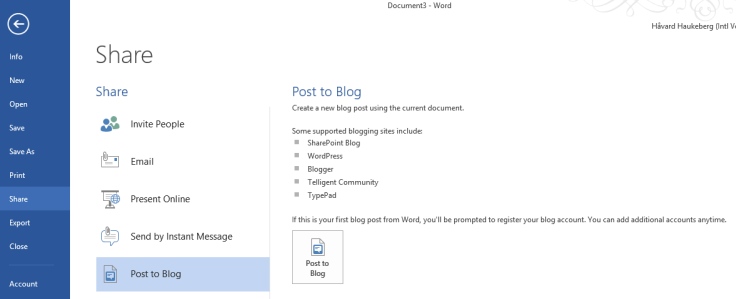
Word 2013 can post to my blog

Cool feature J

As I was clicking around under the file menu, I found this post to blog feature.
Guess what? It supports WordPress, and…. I have a wordpress blog!

Awsome.

Pretty easy.

Check it out this way:
get Office 2013 Preview for free here:
http://office.com/preview

Install and do this:

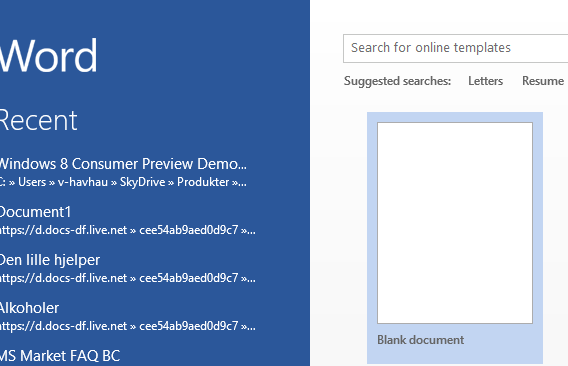
OPEN A BLANK DOCUMENT

CLICK FILE

CLICK SHARE AND THEN CLICK BLOG
Now follow the instructions and enter username+password

Blog at WordPress.com.

Up ↑